How to get your AI API key
This guide is for running EBITDAI on your own provider account, for privacy or extra models. EBITDAI Pro ($15/month) takes your own key for every provider. Free and Lite run on Meta Muse Spark 1.3 Contributor and do not take your own key, so if you are happy on your plan's included usage you can skip this page entirely. Pick your provider below, follow the steps, and paste the key into the add-in. You only do this once.
Kimi Code
EBITDAI is currently the only Excel add-in that runs on a Kimi Code subscription. In addition to integrating with your Kimi code subscription, we offer two other ways to use Kimi in Excel: 1) Our Pro subscription, which comes with 7.5x more usage than lite across every included model, Kimi k3 among them, and 2) the ability to add your own pay-as-you-go API key to your Pro subscription, which allows you to purchase API credits directly from Kimi. The Kimi code subscription is by far the most economic option for heavy usage, but the other two options are not waitlisted and provide enough usage to handle moderate workloads.
Kimi sells two different API keys. Both work with EBITDAI, as different providers.
Kimi has two separate products, each with its own console and its own keys. They are not interchangeable:
- ✓Kimi Code console at www.kimi.ai/code/console. This issues subscription keys (they start with
sk-kimi-). Use these with the Kimi Code provider, the steps on this page. - ✓Moonshot Open Platform at platform.moonshot.ai. This issues pay-as-you-go keys billed per token, with no waitlist. Use these with the Kimi (pay-as-you-go) provider, steps below.
A subscription key pasted into the pay-as-you-go provider (or vice versa) will be rejected. Pick the provider in the add-in that matches where your key came from.
Get your key
- 1Subscribe to Kimi Code if you have not already. Go to kimi.com/code and subscribe (plans start at $19/month). You need an active subscription before you can create a key.
- 2Open the Kimi Code console at www.kimi.ai/code/console and sign in.
- 3Click Create API Key and name it EBITDAI.
- 4Copy the key immediately. It is shown only once. If you lose it, just create a new one.
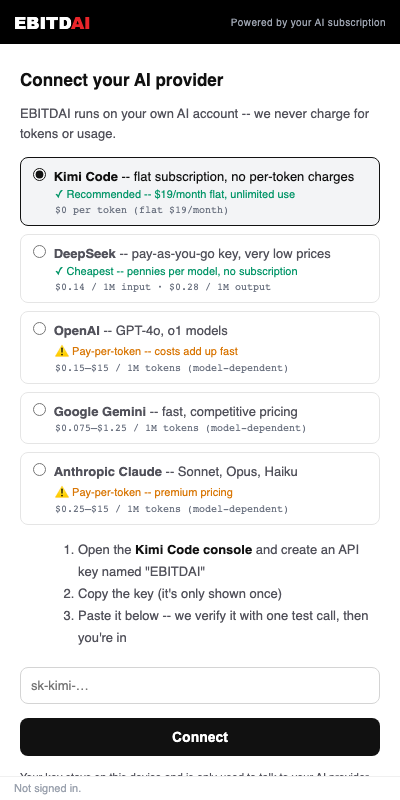
- 5Paste it into the add-in's Connect screen in Excel, with Kimi Code selected as the provider.
How to tell you have the right key: a Kimi Code subscription key starts with sk-kimi-. If your key came from platform.moonshot.ai instead, it still works, just select Kimi (pay-as-you-go) as the provider in the add-in and follow the steps below.
Paste the key into the add-in's Connect screen in Excel. EBITDAI verifies it with one test call, and the key stays on your device. It is never stored on our servers.
Kimi (pay-as-you-go)
The same Kimi k3 model, billed per token instead of by subscription. Keys come from the Moonshot Open Platform, work the minute you create them, and cost $3 per million input tokens ($0.30 cached) and $15 per million output, below Claude's Opus-tier $5/$25, and with no waitlist. If you are waiting on a Kimi Code subscription, this is the way to run k3 today. Full background in the announcement article.
- 1Go to platform.moonshot.ai and create an account. No subscription, no waitlist.
- 2Top up a small balance from the Billing page. Your key will not work until the balance is above zero.
- 3Open platform.moonshot.ai/console/api-keys, click Create API Key, and name it EBITDAI.
- 4Copy the key immediately. It is shown only once and starts with
sk-(notsk-kimi-, that prefix belongs to Kimi Code subscription keys). - 5Paste it into the add-in's Connect screen in Excel, with Kimi (pay-as-you-go) selected as the provider, not Kimi Code.
Which Kimi option should I pick? Same k3 model either way. Kimi Code ($19/month flat, waitlisted) wins on price if you model daily; pay-as-you-go wins on instant setup and suits lighter or occasional use. You can connect both and switch between them mid-conversation.
Paste the key into the add-in's Connect screen in Excel. EBITDAI verifies it with one test call, and the key stays on your device. It is never stored on our servers.
DeepSeek
Pay-per-token with no subscription. A typical model build costs a few cents. Top up a few dollars to start and it will last a long time.
- 1Go to platform.deepseek.com and sign up with your email or phone number.
- 2Top up your balance from the Top up page. A few dollars is plenty to start, and your key will not work until the balance is above zero.
- 3Click API keys in the left sidebar, then Create new API key. Name it EBITDAI.
- 4Copy the key immediately. It is shown only once and starts with
sk-.
Paste the key into the add-in's Connect screen in Excel. EBITDAI verifies it with one test call, and the key stays on your device. It is never stored on our servers.
Google Gemini
Pay-per-token through Google AI Studio, with a free tier to start. EBITDAI includes Gemini 3.8 Flash and lets you switch models mid-session. Available on Pro.
- 1Go to aistudio.google.com/apikey and sign in with your Google account.
- 2Click Create API key. If it asks, pick an existing Google Cloud project or let it create one for you.
- 3Copy the key. It starts with
AI. The free tier works right away; enable billing on the project later if you want higher rate limits.
Paste the key into the add-in's Connect screen in Excel. EBITDAI verifies it with one test call, and the key stays on your device. It is never stored on our servers.
Then paste it into EBITDAI
Back in Excel, open the EBITDAI pane, pick your provider on the Connect screen, and paste the key. EBITDAI verifies it with one test call and you are ready to build. Don't have the add-in yet? Install it from Microsoft AppSource or see the docs for the full setup.
Common questions
Which Kimi API key do I need?
EBITDAI accepts both kinds of Kimi key, but each must be used with its matching provider in the add-in. A Kimi Code subscription key (starts with sk-kimi-, from www.kimi.ai/code/console, requires an active subscription from $19/month) goes with the Kimi Code provider. A pay-as-you-go key from the Moonshot Open Platform (starts with sk-, from platform.moonshot.ai, no waitlist) goes with the Kimi (pay-as-you-go) provider. The two keys are not interchangeable: pasting one into the other provider will be rejected.
What is the difference between Kimi Code and Kimi (pay-as-you-go)?
Same k3 model, two ways to pay. Kimi Code is a flat subscription from $19/month with no per-token charges, the best value for daily use, but new signups go through a waitlist. Kimi (pay-as-you-go) uses a metered key from the Moonshot Open Platform: $3 per million input tokens and $15 per million output, no waitlist, working in minutes. Many users start pay-as-you-go and add a Kimi Code key when their subscription clears.
Does EBITDAI store my API key?
No. When you paste your key into the add-in's Connect screen, EBITDAI verifies it with one test call and then keeps it on your device. It is never stored on EBITDAI's servers.
Which AI provider is cheapest?
DeepSeek is pay-per-token and a typical model build costs a few cents, so topping up a few dollars lasts a long time. Kimi Code is a flat subscription from $19/month, which is the best value for heavy daily use.
Do I need to add a payment method to get a key?
It depends on the provider. DeepSeek and Kimi (metered) ask you to top up a small balance before keys work. Kimi Code requires an active subscription.
Key in hand?
Paste it into the add-in and build your first model in minutes.