Custom finance software, built inside Excel
EBITDAI now builds software for finance teams, on our platform, inside the workbook they already run. This is what it is and why we built it this way.
The gap
Every finance team runs on two things: a set of systems that hold the numbers, and a spreadsheet where the thinking happens. The systems are good at holding. The spreadsheet is good at thinking. Nothing is good at the part in between, so a person does it: exports on the first of the month, a pivot table, paste-values into the model, fix what broke, re-forecast by hand, build the pack. By the time the model is current it is already stale.
The software industry's answer has been to replace the spreadsheet. Move the numbers into a platform, learn its interface, export back to Excel when you need to actually think. Most teams try it, keep the spreadsheet anyway, and end up maintaining both.
What we build instead
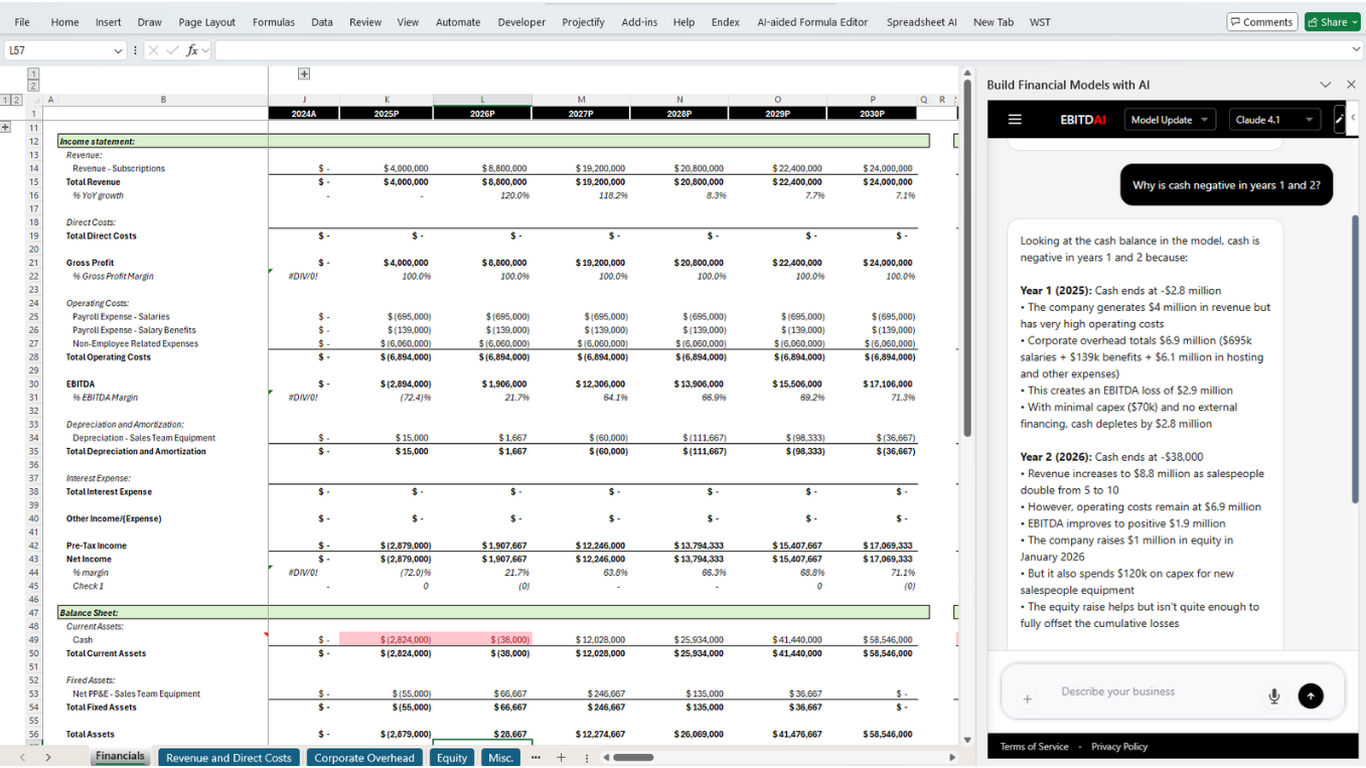
We build the missing part, and we build it inside Excel. EBITDAI is a platform that already lives in the workbook: a pane with an account behind it, encrypted storage for credentials, a relay that can reach any API, and tools that read and write cells with the discipline of a modeler. On that platform we build software specific to one client: their systems connected to their model, their monthly processes turned into things the agent can do.
Any system counts. If it has an API, an export or a login, it can feed the model. Ledger, billing, CRM, payroll, bank, warehouse, the industry tool only your company uses. There is no connector list to be on. The workbook becomes the one place where the numbers agree.
And the interface is a sentence. Because the software is exposed to the EBITDAI agent as tools, your team does not learn anything new. They open the pane and say what they want, the way they would to an analyst who happened to have every login.
What a month looks like
Controller:
"Close August."
EBITDAI:
"August is in. Pulled the ledger, billing and payroll, wrote actuals across the P&L, balance sheet and cash flow, and rolled the forecast to next August. Three variances above 5%: revenue 4% under plan on slower enterprise starts, hosting 11% over on the new region, payroll 6% under because two hires slipped to September. Want me to move the hires in the forecast?"
Controller:
"Yes. Then refresh the board pack and flag anything that changed the runway."
EBITDAI:
"Done. Runway moved from 19 to 21 months, almost entirely the hiring shift. The pack is on the Board tab with the commentary updated."
That is the close, the forecast and the reporting, done in the model the team already trusts, with every pull and every write logged against the account. The commands are whatever your process is. "Reconcile billing to the ledger." "Rebuild the cohort table." "Allocate overhead." "Refresh the lender pack."
What a project usually includes
- Consolidation. Every source mapped to the lines, entities and periods of your model. Multiple entities, currencies and charts of accounts, reconciled in one place.
- Automated close. Actuals land in the model on schedule or on request, variances flagged against plan.
- Rolling forecast. Rolls forward every close, driven by live inputs, so the next twelve months are always current.
- Reporting. Board, lender and investor packs regenerated from the live model, with the agent narrating what changed.
- Your processes, as tools. Whatever your team does by hand every month becomes a command.
- Operation. We keep the integrations and the model current as your systems and your business change.
Why inside Excel
Custom finance software fails on adoption, not on logic. Built as a separate app, it gets used twice. Built where the work already happens, it gets used every month, because there is nowhere else to go. The platform underneath (accounts, credentials, relay, workbook tools, the agent) is built, tested and maintained for every EBITDAI user, so a managed project is new integrations and new process logic on a surface that already exists, not a new system to stand up and babysit.
How it works
- Discovery. One call on the systems you run, the models you keep and the work that eats the month. We come back with a fixed scope and price.
- Build. Integrations and process logic built on the platform, tested against your real data in a sandbox workbook until the numbers tie.
- Deploy. Nothing to install. The software appears in the pane the next time your team signs in.
- Operate. Your team runs it in plain English inside Excel. We maintain it as the business changes.
Who it is for
Finance teams with a model they trust and a close they do not. Companies that evaluated a finance platform and did not want to leave Excel. Fractional CFOs running the same month-end across several clients. If a person is carrying numbers from two or more systems into a workbook by hand, there is a project here.
Request a demo
Bring the model and the list of systems. We come back with a scope, a price, and the sentences your team will type instead.
Related Articles
DeepSeek V4.1 Is Now EBITDAI's Default for Excel
The fastest model in the picker, matching or beating Kimi k3 and Gemini 3.8 Flash at a fraction of the cost.
Read moreMeta Muse Is Now on Every EBITDAI Plan: The Cheapest Model We Have Ever Run
Live on every plan today, at a third of a cent a modeling task. The price and the training terms behind it.
Read moreGemini 3.8 Flash Is Live in EBITDAI Pro
Google's newest Flash model, plus Kimi k3 and DeepSeek V4.1 Flash, on the $15/month Pro plan.
Read more