EBITDAI Now Integrates with QuickBooks, Campfire.ai & Stripe
"Vibe code" your financial models with real accounting and payment data. Build new models and update existing ones using actuals from your accounting system and Stripe.
December 16, 2024 · 5 min read
The Vision: Financial Models That Stay Current
Financial models have always had an expiration date. The moment you finish building one, it starts becoming outdated. Actuals change, assumptions shift, and before you know it, your carefully crafted projections are disconnected from reality.
Today, we're announcing integrations with QuickBooks, Campfire.ai, and Stripe that fundamentally change this dynamic. EBITDAI can now read directly from your accounting systems and payment platforms, giving the AI agent access to real financial data for building new models and, crucially, updating existing ones.
Welcome to the era of "vibe coding" your financial models with real data.
Our New Integrations
QuickBooks Online
Direct OAuth integration
Connect your QuickBooks Online account with a single click. EBITDAI securely accesses your financial reports through OAuth: no credentials stored, full control retained.
Available Reports:
- Profit & Loss Statement
- Balance Sheet
- Cash Flow Statement
- Trial Balance
Campfire.ai
API-based integration
For teams using Campfire.ai's financial data platform, EBITDAI integrates seamlessly via API. Access consolidated financial data across multiple entities with department-level granularity.
Available Reports:
- Income Statement
- Balance Sheet
- Cash Flow Statement
- Trial Balance & General Ledger
Stripe
API-based integration
Connect your Stripe account to access payment and subscription data. Perfect for SaaS businesses modeling MRR, churn, and revenue cohorts.
Available Data:
- Customers & Subscriptions
- Invoices & Payments
- Balance & Payouts
- Products & Prices
What This Enables
Build Models from Actuals
Instead of starting with assumptions, start with reality. Tell EBITDAI to build a forecast model and it will pull your historical P&L, identify trends, and create projections grounded in actual performance.
Update Models with Fresh Data
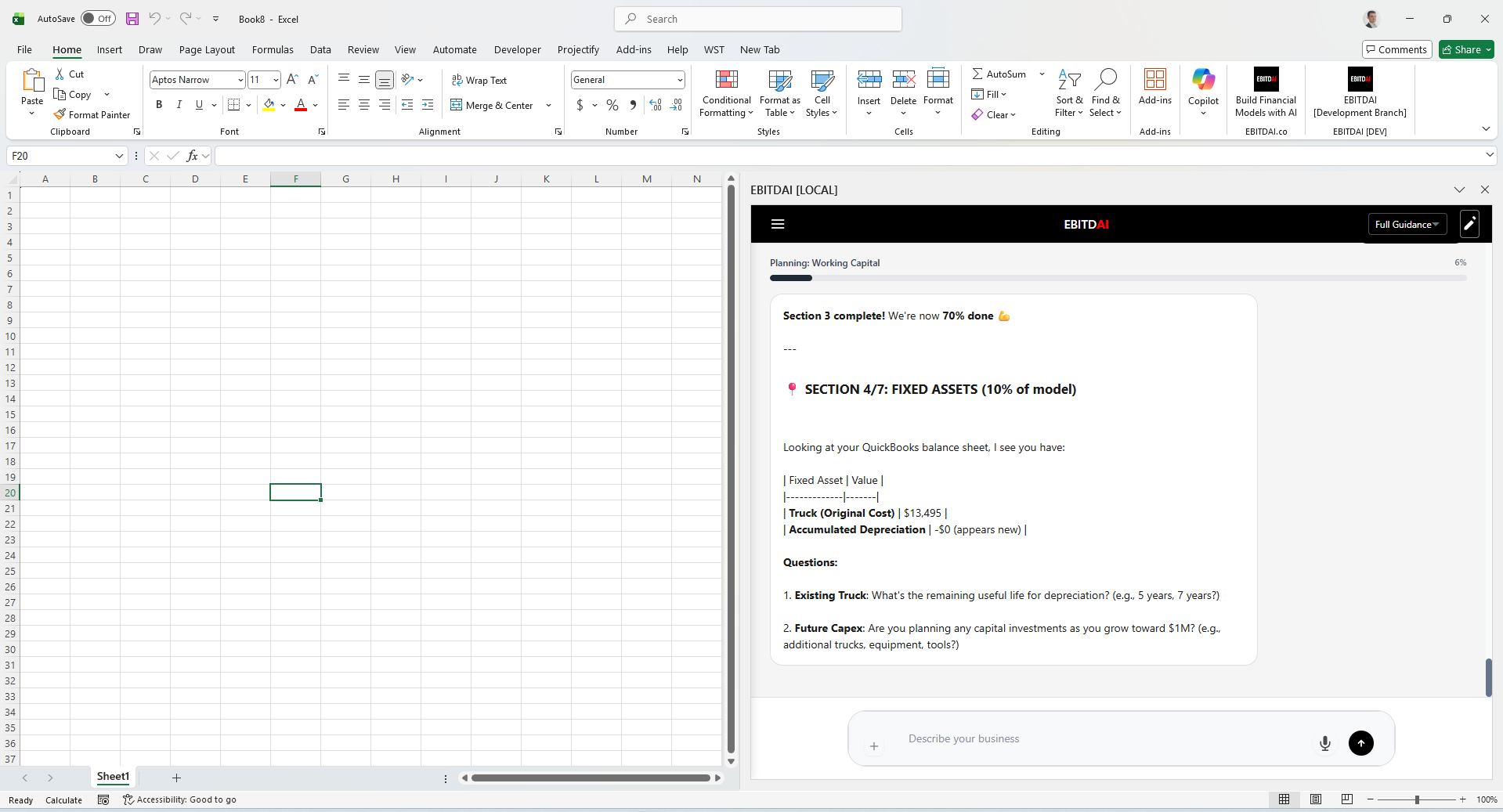
This is where it gets powerful. Already have an EBITDAI model? Open it and ask the agent to "update the model with latest actuals from QuickBooks." The AI compares your projections to what actually happened, updates historical periods, and recalibrates forecasts.
Vibe Code Your Updates
The term "vibe coding" has captured something real about working with AI: you describe intent, the AI handles implementation. Now apply that to financial models: "Pull Q3 actuals and show me where we beat forecast" or "Update the revenue model to reflect what we're actually seeing in the data."
How It Works
Connect Your Data Sources
Navigate to the integrations section in EBITDAI. For QuickBooks, click "Connect" and authorize access through Intuit's secure OAuth flow. For Campfire.ai or Stripe, enter your API key.
Build or Open a Model
Start a new model or open an existing one, then just describe what you need in the chat.
Reference Your Data
In your prompt, mention that you want to use accounting data. Examples:
- • "Build a forecast using my QuickBooks P&L from the last 12 months"
- • "Update this model with actuals through November from Campfire"
- • "Compare my forecast to actual results from QuickBooks and explain variances"
- • "Pull my Stripe subscription data and build an MRR forecast"
Review and Refine
EBITDAI pulls the relevant data, incorporates it into your model, and explains what it did. Ask follow-up questions or request adjustments. The AI maintains context throughout.
🔒 Security & Privacy
Read-only access: EBITDAI only has read access to your accounting data. We cannot modify, delete, or write any transactions in your accounting system.
OAuth authentication: QuickBooks integration uses Intuit's official OAuth 2.0 flow. Your credentials are never stored by EBITDAI.
Your data, your control: You can disconnect integrations at any time from your account settings or directly from within QuickBooks/Campfire/Stripe.
AI-Powered Outreach
Beyond integrations, EBITDAI's AI agent can analyze your contacts and generate personalized outreach emails, identifying the highest-potential leads and crafting messages tailored to each recipient.
Looking Forward
These integrations represent the first step in our vision for continuously-updated financial models. We're exploring integrations with additional accounting platforms, ERP systems, and data sources.
The goal is simple: your financial model should be a living document that evolves with your business, not a static artifact that becomes outdated the moment it's created.
QuickBooks, Campfire.ai, and Stripe integrations are available now for all EBITDAI users.
Ready to Connect Your Accounting Data?
Start building financial models grounded in real data.
Related Articles
Gemini 3 Now Powers EBITDAI Model Encoding
Google's Gemini 3 delivers significantly more reliable model encoding.
Read moreWhat Sets EBITDAI Apart from Other AI Tools
Our focused approach delivers higher quality results and reliable integrations.
Read moreHow EBITDAI Works
AI revolutionizes financial modeling through a three-phase process.
Read more